(Using Birtwistle’s Silbury Air)
For years, metric modulation was the one thing that sent me back to a pencil, a calculator, and a lot of muttering. Here’s how FlowFrame turns it into two dropdown menus and how I used it to practice a notoriously slippery corner of Harrison Birtwistle’s Silbury Air.
If you’ve ever tried to build a click track for a piece that changes its pulse mid-stream, you already know the problem. Most metronome apps assume the beat is a fixed thing. Music doesn’t. And contemporary repertoire (Carter, Ferneyhough, Adès, and the piece I want to talk about today) treats the pulse as something you carry across the bar line, hand off, and re-measure on the other side. That’s metric modulation, and it’s exactly what FlowFrame was built to handle.
What is metric modulation, quickly
Metric modulation (Elliott Carter called it tempo modulation) is a change in tempo derived from a note value that’s already sounding. A note from the old measure is set equal to a note in the new one — a pivot, like a common tone in a key change. The pivoting value sounds the same on both sides of the bar line, even though everything around it reorganizes. If you can keep that one value steady in your body, the modulation takes care of itself.
That’s the whole game. And it’s the part FlowFrame does the arithmetic for, so you can spend your practice time playing instead of converting.
The story: Silbury Air and the pulse labyrinth
Birtwistle wrote Silbury Air in 1977 for chamber ensemble, named after the prehistoric mound in Wiltshire (the largest man-made mound in Europe, and one whose purpose nobody has ever cracked). The music is just as deliberate. Birtwistle built the piece on what he called a “pulse labyrinth”: a grid of related tempos and meters, printed in the preface of the score, that he navigated as he composed. Every speed in the piece connects to every other through proportional, metric-modulation relationships — David Beard (via Ethan Iverson) compared it to the gearbox in a car, shifting smoothly between ratios.
Which is thrilling to listen to and humbling to prepare. Look at the excerpt below. In the span of a few bars the ensemble moves from 5/4 to 15/16 and then into a 4/4 at quarter = 120, and the modulation markings tell you exactly how the pulse is being handed across.
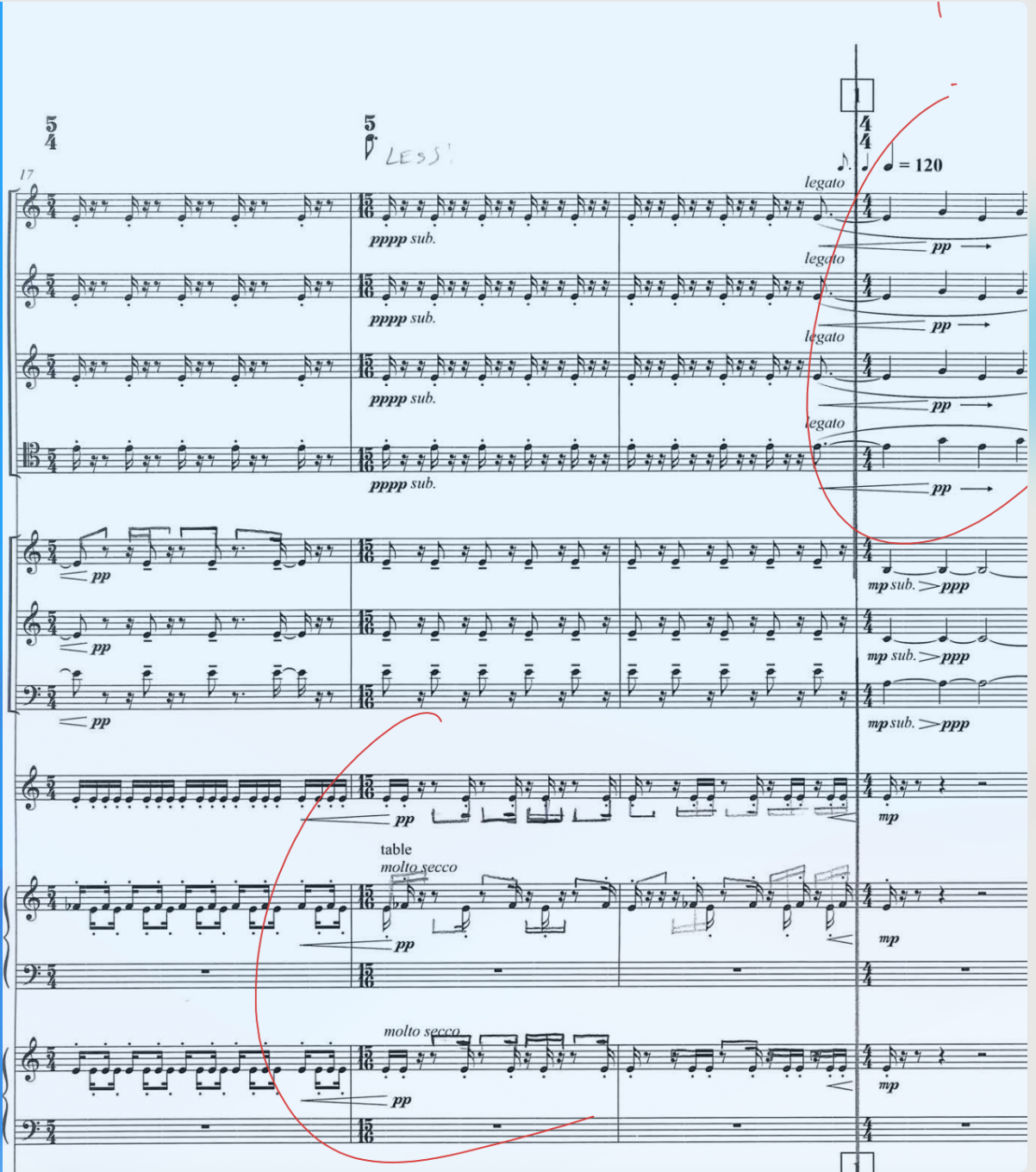
An excerpt from Birtwistle’s Silbury Air*. Two different modulation relationships in just a few bars.*
There are two relationships I want to isolate here, because they’re two different kinds of modulation and they show off the whole feature:
- From the first measure to the second, the sixteenth note stays the same. The meter reorganizes (5/4 into 15/16), but the underlying sixteenth never flinches. Your job is to hold that sixteenth and let the bar lines move around it.
- From the third measure to the fourth, the dotted eighth becomes the quarter. Now the pivot is a dotted value — the dotted eighth of the old tempo is reborn as the quarter at the new quarter = 120. This is the kind of relationship that’s genuinely hard to feel cold, and exactly where a click earns its keep.
Trying to wrangle this in a DAW is a special kind of misery. In FlowFrame, each of these is two clicks.
How to set up a metric modulation in FlowFrame
When you’re building a measure, you’ll find a Metric Modulation panel. Here’s the entire workflow:
- Check “Enable metric modulation to next measure.” This tells FlowFrame the pulse is going to shift as you cross into the following bar.
- Set the “From Subdivision” (this measure) — the note value you want to hold constant out of the current bar.
- Set the “To Subdivision” (next measure) — the note value that pivot becomes in the new bar.
- That’s it. FlowFrame reads the relationship, does the tempo math, and the modulation lands automatically at the end of the measure.
You’ll see a live summary at the bottom of the panel — “[From] → [To] — Modulation will occur at the end of this measure” — so you can confirm the relationship before you ever hit play.
The dropdowns aren’t limited to the basics, either. They go well past quarter and eighth — you can pivot on a quintuplet quarter note, a dotted value, a tuplet subdivision, whatever the score throws at you. (If you’ve ever had to modulate off a quintuplet by hand, you know why that menu makes me happy.)
Setting up the two Silbury Air modulations
Modulation 1 — the sixteenth stays the same (m.1 → m.2):
- From Subdivision: Sixteenth note
- To Subdivision: Sixteenth note
Same value in, same value out. FlowFrame keeps the sixteenth rock-steady while the meter shifts underneath it, so you can drill the reorganization without losing the thread.
Modulation 2 — the dotted eighth becomes the quarter (m.3 → m.4):
- From Subdivision: Dotted eighth note
- To Subdivision: Quarter note
The dotted eighth of the outgoing tempo becomes the quarter of the new one (landing you at quarter = 120). FlowFrame calculates the proportional jump and clicks it for you. You just have to feel the pivot — which, once you’ve heard it click cleanly a dozen times, you will.
Build the rest of the bars around these two and you’ve got a click that walks you straight through this stretch of the labyrinth. Loop it, slow the whole thing down, and bring it up to tempo over a week. Suddenly the scariest few bars on the page are just Tuesday’s warm-up.
Why this matters for how you practice
A metronome that can only hold one tempo teaches you to play at a tempo. A click that can modulate teaches you to play across tempos — to internalize the relationship, not just the number. That’s the actual skill the music is asking for. With FlowFrame, you can build the relationship once, link the click to a practice block, record yourself navigating it, and watch your accuracy tighten over time in your practice history.
Metric modulation used to be the thing I dreaded setting up. Now it’s two dropdowns and a checkbox. Birtwistle did the hard part in 1977. FlowFrame just makes it practiceable.
Your turn
Pull up flowframe.app, open a new pattern, and try the two Silbury Air modulations above. Then find the gnarliest modulation in whatever’s on your stand right now and build it. If you hit a relationship FlowFrame can’t express yet, drop me a note — that’s usually how the next feature gets born.
Happy clicking, pivoting, and music-making.
Frequently asked questions
What is metric modulation in music? Metric modulation is a tempo change derived from a note value that’s already sounding: a note in the current measure is set equal to a note in the next, acting as a pivot between two tempos. The pivot value sounds identical on both sides of the change even though the surrounding pulse reorganizes. Elliott Carter, who pioneered the technique, called it tempo modulation.
How do I make a click track with changing tempos? In FlowFrame, enable “metric modulation to next measure” on the measure where the pulse changes, then choose the “From Subdivision” (the note value you’re holding constant) and the “To Subdivision” (what that value becomes). FlowFrame calculates the proportional tempo shift and applies it automatically at the bar line — no manual math required.
Can a metronome handle metric modulation? Most metronome apps can’t — they assume a single fixed tempo. FlowFrame is built specifically for changing meters, metric modulations, tuplet subdivisions, and linear tempo ramps, so you can practice modulating repertoire with an accurate click instead of building workarounds in a DAW.
What note values can I modulate between in FlowFrame? FlowFrame supports a wide range of subdivisions as pivot values — quarter, eighth, sixteenth, dotted values, and tuplets including quintuplet quarter notes — so you can match the exact modulation relationship printed in your score.
Why is Silbury Air hard to practice? Harrison Birtwistle built Silbury Air (1977) on a “pulse labyrinth,” a grid of proportionally related tempos and meters printed in the score’s preface. The piece moves between these speeds through metric modulation, so playing it well means internalizing the relationships between tempos rather than just hitting fixed numbers — exactly the skill a modulating click track helps you develop.